
TL;DR
AI headshots usually need light finishing, not heavy retouching. Use editing software for crop, exposure, color, and export; regenerate the image when facial identity, anatomy, clothing, or background realism looks wrong.
A strong AI headshot can still fail if the final crop, skin texture, lighting, or export size feels slightly off. Photo editing software for AI headshot touch-ups helps polish an already usable portrait, while an AI headshot generator should handle bigger creative fixes. Graphics software: a program or collection of programs that lets people visually manipulate images or models on a computer. Software: computer programs and related specifications that instruct a computer to perform tasks. For polished business portraits, Looktara fits the generation side of the workflow, then editing tools can handle the last few technical adjustments.
Table of Contents
What is photo editing software for AI headshot touch-ups?
Photo editing software for AI headshot touch-ups is any image editing tool used to refine an AI-generated portrait after creation, usually by adjusting crop, light, color, minor blemishes, background edges, and file output. It is not the best fix for a headshot where the face, hands, clothing, or scene looks unrealistic.
AI headshot workflows now split into two jobs: generation and finishing. Generation creates a new professional-looking portrait from source images. Finishing makes a good output more usable across LinkedIn, resumes, newsletters, websites, and dating profiles.
A 2023 MIT Press ebook by Pippin Barr, The Stuff Games Are Made Of, discusses digital works as constructed software objects. That distinction matters for portraits: the headshot is not just a photo, it is also the result of software choices, model assumptions, and export settings.
Key insight: editing software should improve a believable AI headshot, not rescue an unbelievable one.
Core editing terms for AI portraits
- Retouching: small changes to skin, shine, stray hairs, lint, or under-eye shadows.
- Relighting: changing brightness, contrast, highlights, and shadow depth.
- Background cleanup: removing edge artifacts, odd texture, color banding, or distractions.
- Crop and composition: resizing the headshot for platform framing, usually head and shoulders.
- Regeneration: creating a new AI headshot because the original output has structural or realism issues.
Which edits belong in software, and which need regeneration?
Small presentation fixes belong in editing software, while identity, realism, and anatomy problems usually need regeneration. The safest rule is simple: edit pixels when the person still looks real, regenerate when the portrait looks like a different person or a synthetic scene.
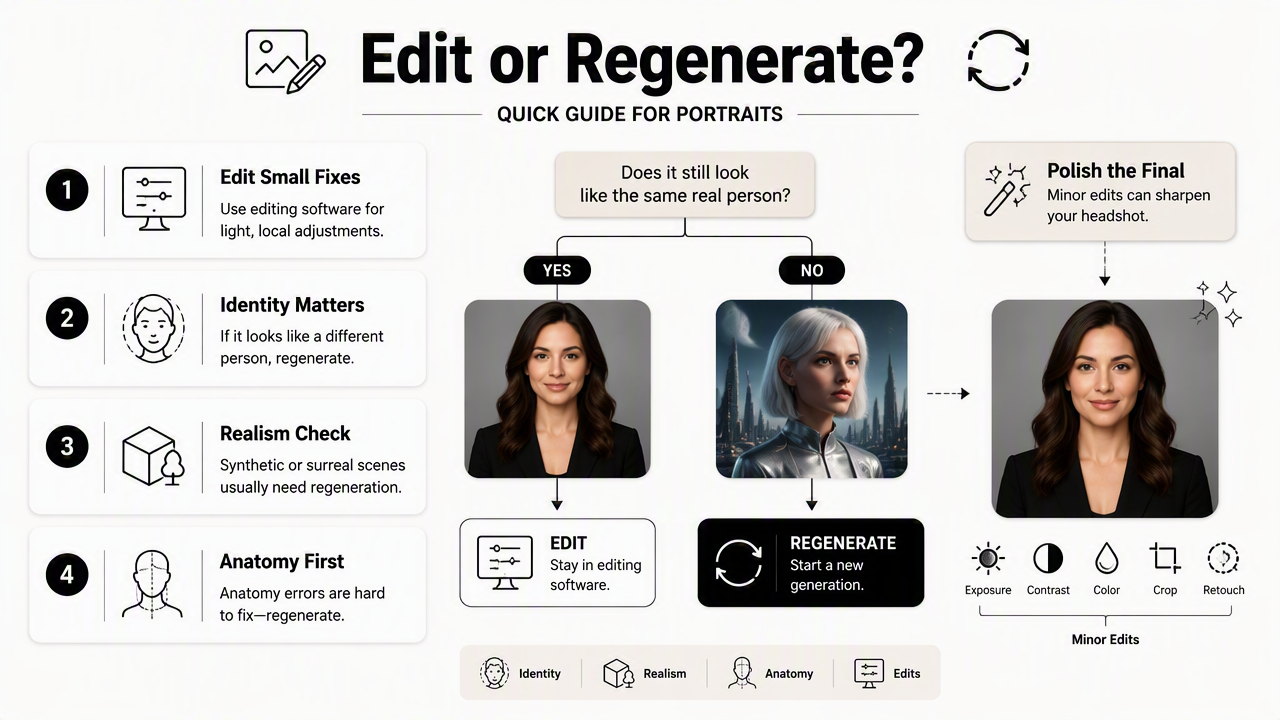
Minor edits can sharpen a final headshot without changing character. Heavy edits often create a plastic finish, mismatched skin, or an unnatural corporate stock-photo look. For career profiles, authenticity matters because recruiters and clients expect the headshot to match the person who appears on calls.
Edit-or-regenerate decision table
| Headshot issue | Fix in editing software | Regenerate in AI headshot tool | Practical standard |
|---|---|---|---|
| Cropping | Adjust headroom, shoulders, aspect ratio | Regenerate if face is cut off or pose is unusable | Face centered, eyes high in frame |
| Lighting | Brighten exposure, soften contrast, reduce glare | Regenerate if light direction is impossible | Natural shadow under chin and jaw |
| Skin texture | Remove temporary blemish or shine | Regenerate if skin looks waxy or over-smoothed | Pores and normal texture remain visible |
| Background cleanup | Clean small edge marks or color distractions | Regenerate if background warps around hair or shoulders | Simple, believable professional setting |
| File export | Resize, compress, sharpen for web | Regenerate only if source resolution is poor | Clear at small profile sizes |
| LinkedIn-ready output | Crop to a square, balance color, export cleanly | Regenerate if expression, outfit, or identity misses the goal | Professional, current, recognizable |
The most common mistake is treating every flaw as an editing problem. If the jawline, eye shape, glasses, teeth, hands, or clothing seams look incorrect, editing can make the image cleaner but not more trustworthy.
A calm review process helps. A strong final check compares the portrait against a recent real photo, a target platform preview, and the intended use case. If all three pass, editing software can finish the job.
How Looktara handles AI headshot finishing
Looktara handles AI headshot finishing by focusing on professional portrait generation first, then leaving room for light edits that match real platform needs. The better the generated headshot, the less correction is needed later.
The Looktara platform is especially useful when the goal is a clean professional identity rather than experimental image making. A job seeker may need a credible LinkedIn image, while a founder may need a consistent portrait for investor decks, press pages, and social profiles. In both cases, the first output should already look close to final.
For niche professional branding, category-specific tools can speed decisions. Fitness professionals, coaches, and wellness consultants can compare portrait direction with a fitness LinkedIn and resume headshot generator. Creators who publish regular updates can also align headshots with audience-facing assets through a fitness newsletter resume headshot generator.
Best-fit workflow by user type
| User type | Best generation goal | Best editing task after generation |
|---|---|---|
| Job seeker | Polished, current, recruiter-safe portrait | Square crop, exposure balance, file compression |
| Entrepreneur | Confident brand image across web and press | Background consistency and color tone |
| Freelancer | Friendly, trustworthy service profile | Crop variants for marketplaces and email |
| Influencer | Authentic face-forward image | Mild skin cleanup and platform sizing |
| Dating app user | Natural, attractive, not overproduced | Warm color balance and realistic texture |
A lighter touch usually wins. Strong headshot platforms produce images that need normal finishing, not reconstruction. That reduces the risk of an image looking edited after upload.
How should an AI headshot be touched up for LinkedIn and profiles?
An AI headshot should be touched up for LinkedIn and professional profiles by checking realism first, applying light technical edits second, and exporting a clean file last. The process should preserve facial identity, skin texture, expression, and a believable professional setting.
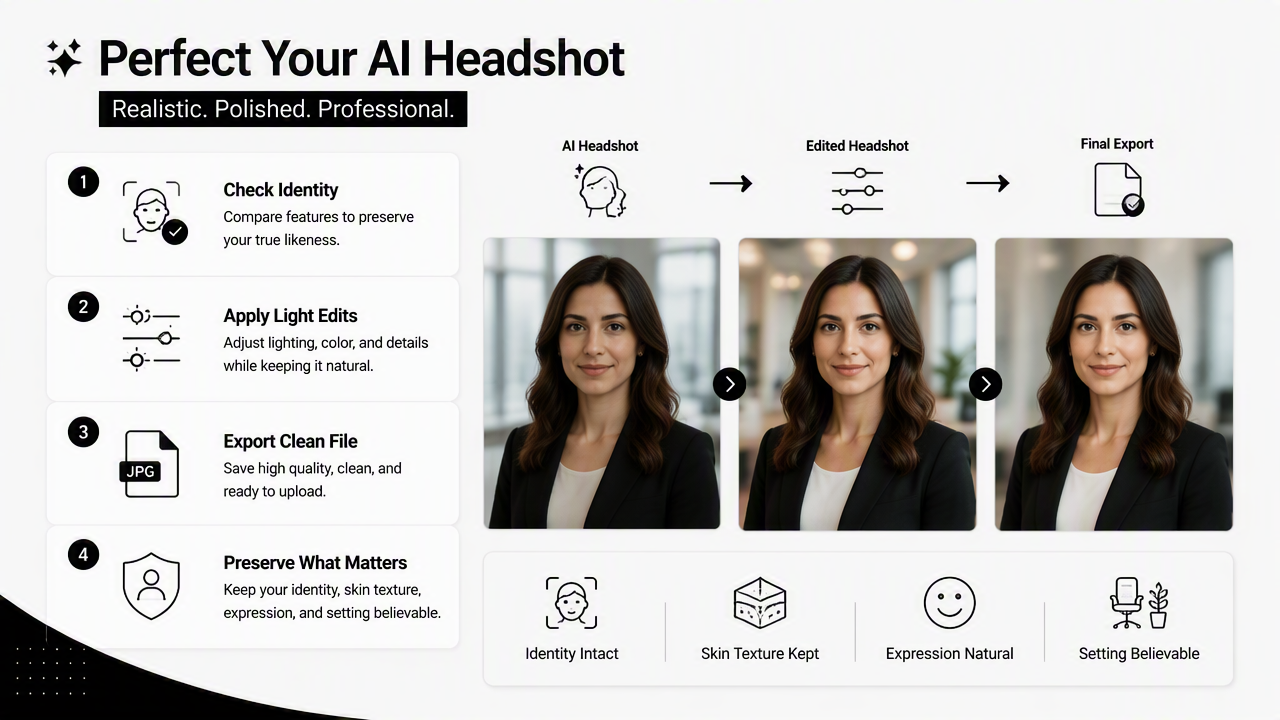
- Check identity match. Compare the headshot with a recent real photo before any edits.
- Set the crop. Use a square or platform-friendly frame with clear head-and-shoulders composition.
- Balance light. Lift shadows, protect highlights, and avoid dramatic contrast.
- Keep skin real. Remove temporary blemishes, not natural texture.
- Clean the background. Remove small distractions without changing the setting's logic.
- Export carefully. Save a sharp web file that still looks clean when compressed.
Quick quality checklist before upload
- The face looks recognizable at small thumbnail size.
- Eyes, teeth, glasses, and hair edges look natural.
- Clothing lines and collar shapes make physical sense.
- Background edges do not ripple around shoulders.
- Skin has normal texture, not a wax or airbrush finish.
- The expression matches the intended context.
Editing apps can handle these checks well when the source image is already credible. If several checklist items fail at once, a new generation round will usually save time.
For business use, versioning also matters. A LinkedIn crop may not fit a website bio, newsletter byline, speaker one-sheet, or dating profile. Exporting two or three versions from the same approved portrait keeps the image consistent without forcing one crop everywhere.
Best practice: one believable AI headshot can produce several useful profile images, but one flawed portrait should not be edited into many formats.
What should change in AI headshot editing by 2027?
AI headshot editing should become more identity-aware, platform-specific, and disclosure-conscious by 2027. The biggest shift will be less manual repair and more guided regeneration, where software recommends whether to crop, retouch, relight, or rebuild the portrait from scratch.
Professional profile platforms already reward clarity and consistency. The next generation of tools will likely focus on previewing how a headshot appears across LinkedIn, resumes, personal websites, newsletters, and creator profiles before export. That will make profile-ready output more important than generic image quality.
The smarter workflow will also separate acceptable enhancement from misleading alteration. Temporary blemish cleanup, color correction, and crop changes are normal. Changing facial structure, age cues, body shape, or identity markers crosses into a different category and can reduce trust.
2027-ready editing priorities
- Identity consistency: the portrait should match real-world appearance across video calls and meetings.
- Platform previews: crops should be checked before upload, not after.
- Low-edit generation: better AI outputs should need fewer touch-ups.
- Natural texture: skin, hair, fabric, and background materials should keep detail.
- Brand consistency: professionals should maintain a similar look across public profiles.
With Looktara, the strongest workflow is to start with a realistic headshot direction, select the most credible image, then use editing software only for final polish. For a direct starting point, visit looktara.com and choose the portrait style that fits the intended profile use.
FAQ about AI headshot touch-ups
AI headshot touch-ups work best when they support a realistic portrait rather than hide major flaws. These common questions cover the practical decisions most people face before uploading a professional image.
Can editing software fix a bad AI headshot?
Editing software can improve exposure, crop, color, small blemishes, and minor background distractions, but it cannot reliably fix a bad AI headshot. If the face looks unlike the person, facial features are distorted, or the setting feels fake, regeneration is the better option.
How much skin retouching is too much for a professional headshot?
Skin retouching becomes too much when normal texture disappears. A professional headshot should look rested and polished, not plastic. Temporary blemishes, shine, and small distractions can be reduced, but pores, expression lines, and natural facial detail should remain visible.
What file should be exported for LinkedIn?
A LinkedIn-ready headshot should be exported as a clean, sharp web image with a square crop and enough resolution to stay crisp after upload. The exact settings can vary by workflow, but the face should remain clear when viewed as a small circular profile image.
Should AI headshots be edited for dating apps?
AI headshots for dating apps should be edited more lightly than corporate portraits. Warm color, natural skin, and a relaxed crop usually matter more than formal polish. If the image looks like a business headshot or a synthetic studio portrait, regeneration with a more casual direction may work better.
Conclusion
The best photo editing software for AI headshot touch-ups is the tool that improves a believable image without changing the person behind it. Editing should handle crop, light, color, minor cleanup, and export. Regeneration should handle identity, realism, anatomy, outfit, and scene problems. For a practical next step, pick the most natural AI headshot first, run it through the quality checklist, then make only the edits needed for the target platform. If the portrait still needs structural repair, return to the generator before spending time on touch-ups.
Generated by EarlySEO.com